The Rise of Codeless QA: Tools Transforming Software Quality

In today’s fast-paced software world, quality assurance (QA) can no longer be a bottleneck. Traditionally, automated testing required writing code - meaning only developers or skilled automation engineers could contribute.
Enter codeless QA tools: platforms that let anyone, from QA testers to business analysts, create, execute, and maintain automated tests without writing code. These tools use drag-and-drop, record-and-playback, AI, and natural language flows to simplify testing while maintaining reliability.
Here’s a guide to the most promising codeless QA tools, how they work, and real-world examples.
1-Testim [ Licensed commercial software | Tricentis ]
How it works
Testim uses AI-powered, self-healing test automation. It records real user actions on a web application and converts them into smart automation tests. These tests don’t rely on fragile selectors. If the application UI changes—like a button moving or a layout update—Testim automatically adapts the test without breaking.
Example
Testing a login page with Testim
Imagine you’re a QA engineer testing a live web application used by customers every day.
Step 1: Create the test visually
Testim captures these actions exactly as a real user performs them.
After clicking Sign In, Testim automatically checks that:
A few weeks later, the development team updates the UI:
✅ The test continues to pass
✅ No manual updates needed
✅ No wasted maintenance time
My Conclusion: Agile teams with frequently changing UIs.
2 - Leapwork [Licensed commercial software]
How it works:
Leapwork uses visual flowcharts to create automated tests. Instead of writing code, you build tests by dragging and connecting blocks such as Navigate, Click, Fill Form, and Verify. Each block represents a user action, and the flow shows the complete test logic in an easy-to-understand way.
Example:
This example shows how Leapwork automates a login test using a visual flowchart and Excel data.
The test starts by opening a browser and navigating to the login page. It then reads usernames and passwords from an Excel file, allowing the same test to run for multiple users. These values are visually connected to the login fields—no code required. After logging in, Leapwork checks for a visible element on the next page to confirm the login was successful.
Because everything is built with drag-and-drop blocks, the test is easy to understand, update, and share—even for non-technical users.
Best for: Non-technical testers and business users.
3- Katalon Studio [ Licensed commercial software | KMS Technology]
How it works: Katalon Studio combines record-and-playback with keyword-driven automation. It automatically generates test scripts from recorded actions, while also allowing users to enhance tests using built-in keywords. Katalon supports web, mobile, API, and desktop testing in one unified platform.
Example: Testing a login page with Katalon Studio
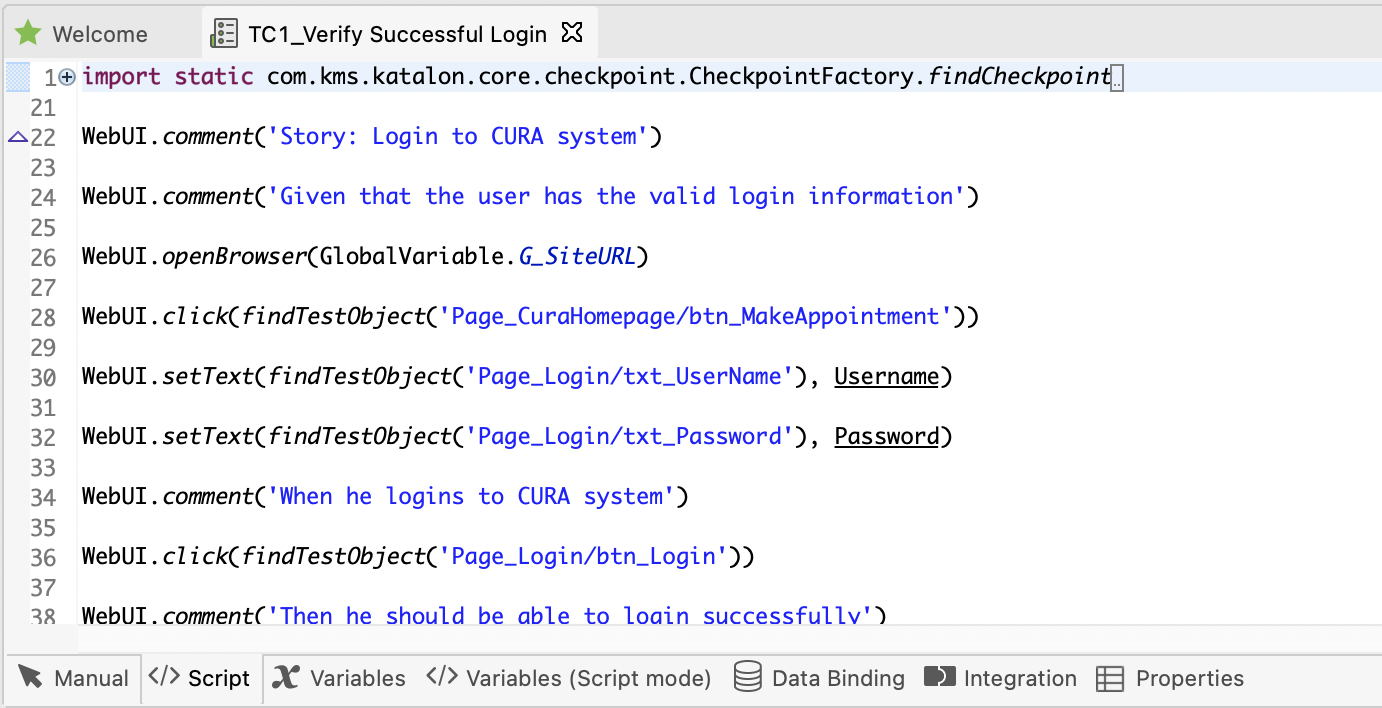
This example shows how Katalon Studio helps you automate a login test by recording user actions and converting them into a script automatically. The test opens a browser, navigates to the login page, enters username and password from test data, clicks the login button, and verifies successful login.
Katalon’s combination of record-and-playback with keyword-driven steps makes it easy for both beginners and advanced users to create, read, and maintain tests—all within one powerful platform.
Best for: Teams that want an all-in-one solution bridging novices and advanced
4- TestSigma [Provides a free plan]
How it works:
TestSigma uses natural language automation, letting you write test steps in plain English. Their AI interprets these instructions and converts them into automated tests that run across browsers and devices—no coding needed.
Example:
Login page with TestSigma
This screenshot shows a TestSigma test case where steps are written in plain English to automate filling out a web form.

Navigate to the specified URL (https://techelliptica.com/login.php)
Click on SIgn In Button
Enter “pallavi.gaikwad12345@gmail.com” in the USERNAME field
Enter “abc@123” in the Password field
Click on the SIGN IN button
Best for: Teams seeking cross-platform, readable automation.
5- Autify [ Licensed commercial software]
How it works:
Autify records user flows by capturing your actions in the app. It then uses AI-powered self-maintenance to keep tests working even if the UI changes, such as when buttons move or labels update.
Example:
Record a user signing up:
Autify automatically updates locators if the signup button changes in a future version.
Best for: Web and mobile regression testing.
6-DoesQA [Licensed commercial software]
How it works:
DoesQA offers drag-and-drop automation combined with detailed reporting to simplify test creation and monitoring. It’s built for functional testing and continuous workflow monitoring.
Example: Imagine you want to automate the process of generating invoices.
This flow visually maps out the test, making it easy to build and maintain.
Best for: Teams needing quick test setup with rich insights.
7- Rainforest QA [Licensed commercial software]
How it works:
Rainforest QA runs codeless automated tests at scale by combining AI with a distributed human workforce. It integrates seamlessly into CI/CD pipelines, enabling continuous testing and fast feedback.
Example:
Running Regression Tests Before Release
Imagine you want to ensure your app’s login and dashboard work perfectly before shipping a new version.
Best for: Scalable, fast execution for continuous delivery teams.
8- BrowserStack Low-Code Automation [Licensed commercial software|BrowserStack]
How it works:
BrowserStack offers a record-and-playback tool that lets you create automated tests without writing code. Tests run on real devices and multiple browsers/OS simultaneously, providing reliable, real-world validation.
Example:
Logging into an E-commerce Site
Record a login test on your desktop browser—typing username, password, and clicking login.
Screenshot of BrowserStack recorder capturing user actions.
Replay the recorded test on various browsers like Chrome, Firefox, Safari, and on mobile devices (iOS and Android).
Dashboard showing parallel test runs on different devices and browsers.
View results in a centralized dashboard with pass/fail status and detailed logs.
Test results dashboard summarizing cross-browser/device outcomes.
Best for: Teams testing real-world devices and cross-browser scenarios.
9 - BugBug [Licensed commercial software]
How it works:
BugBug lets you record browser actions directly and replay them for automated web testing. It’s lightweight, simple, and focused entirely on web applications—no complex setup or coding required.
Example: Testing a Shopping Cart
Record yourself adding items to a shopping cart on an e-commerce site.
Screenshot of BugBug recorder capturing clicks and inputs.
Replay the recorded steps to automatically add items again and verify the checkout process works.
Playback view showing the automation running in the browser.
Confirm that the checkout completes successfully each time.
Notification or confirmation screen showing successful checkout.
Best for: Quick web testing with minimal setup.
Why Codeless QA Is Gaining Momentum
Final Thoughts
Codeless QA tools are changing the way teams test software. By removing the need to write code, they make testing accessible to more people, encourage better teamwork, and speed up feedback. With features like AI-based self-healing, plain-English test steps, and visual workflows, these tools reduce maintenance effort while keeping tests reliable—even as applications change.
Codeless testing doesn’t replace traditional automation; it works alongside it. This balance helps teams move faster, scale their testing efforts, and still maintain strong technical control. As software development continues to move quickly, teams that adopt codeless QA tools will be able to release with confidence, improve faster, and maintain high quality without slowing down innovation.